


Mobile app: My Rush, powered by Rush Connect
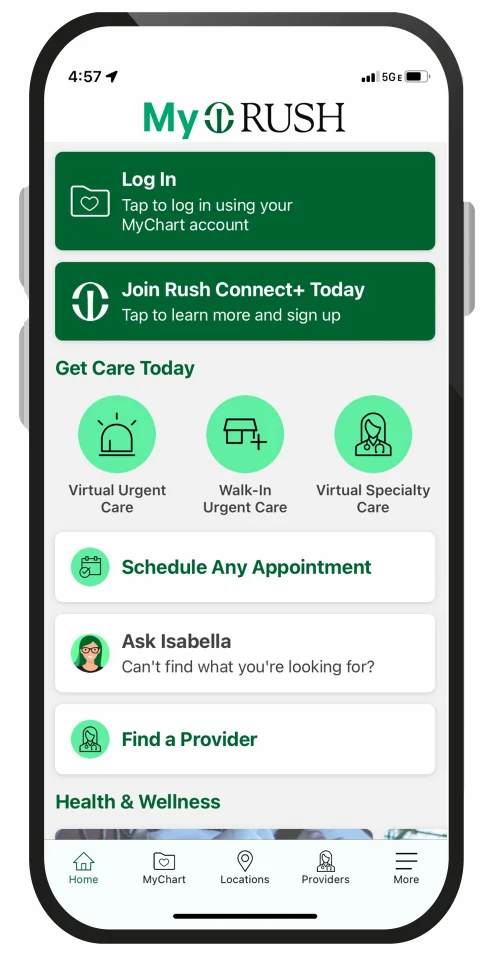
The My Rush mobile app helps you find care, navigate to appointments, manage your health and more.
My Rush has all your favorite MyChart features that allow you to:
- Access your medical history and immunization records
- Schedule appointments
- View test results
- Find detailed information about medications prescribed by your doctor
- Send messages to your care team
- Pay your bill
And it offers an expanding collection of new features designed to make your Rush health care experience simpler and more convenient for you and your family:
- View, manage and check in for your upcoming appointments all in one place
- Get turn-by-turn directions to your appointments in the car and within the clinic using "Let's Go". Available at Rush University Medical Center, Rush Copley Medical Center, Rush Oak Park Hospital and Rush North & Harlem.
- Schedule any new Rush appointments, including in-person appointments as well as same-day and next-day virtual visits through Rush Connect Virtual Urgent Care and Rush Connect Virtual Specialty Care
- Ask Isabella, a virtual assistant that can review your symptoms and guide you to the best care options
- Access Rush Connect+, our new virtual health membership
- See live urgent care wait times at some clinics
- Find personalized health and wellness resources
- Recognize your care team with a donation to support Rush's mission
- Available in English and Spanish
The My Rush app is part of our ongoing work to expand and improve digital health care across Rush. We’re excited about what's next — both inside the app and at your doctor's office.
How to get started
- Download the new app. Go to the App Store (for Apple iOS) or Google Play (for Android) on your mobile device to download the app.
- Log in using your MyChart account. If you already have a MyChart account, use your credentials to log in. If not, you can sign up online via the MyChart registration page. You will be prompted to re-enroll in two-factor authentication and any biometric logins in this new app.
- Enable notifications and permissions. Turn on push notifications for real-time appointment updates. Allow location access to support rideshare integration and turn-by-turn indoor navigation at certain Rush locations.


Patient portal: MyChart
If you're accessing your health record on your computer, use MyChart. To create a MyChart account, visit the MyChart registration page. Use the access code provided at the time of your appointment or enter your information to create an account.
Both outpatients and inpatients can also access MyChart by filling out an access request form. If you include your email address on the form, Rush will email your activation code. Fill out the form, and then email or fax it to the Health Information Management Office:
Email: mychartrequest@rush.edu
Fax: (312) 942-5549
MyChart password reset
 Did you forget your MyChart password? Verifying your identity is easy and secure now that Rush has partnered with CLEAR as an option to reset your password.
How it works
- Follow the prompts about MyChart password reset from your desktop, phone or other device to reset your password.
- Log into your CLEAR account or enroll by entering your email address or phone number, taking a quick photo, and scanning your government-issued I.D.
- Not a CLEAR member? Create a free CLEAR account in just minutes. You’ll be asked to add your government-issued I.D. and snap a photo to verify your identity.
Help and support
If you have questions about the My Rush app, MyChart or resetting your MyChart password, call the MyChart Helpline at (312) 563-6600. Please do not use the My Rush app or MyChart to send messages related to medical emergencies.